
DSA stands for Data Structures and Algorithms.
It is a core concept in computer science that focuses on:
- Data Structures → How data is stored, organized, and accessed
- Algorithms → Step-by-step procedures to solve problems efficiently
Think of DSA as:
Data Structures = How you keep things
Algorithms = How you use those things to solve problems
What are Data Structures?
Data Structures define how data is arranged in memory so it can be used efficiently.
Common Data Structures:
- Array – Stores elements in a fixed order
- Linked List – Dynamic collection of elements linked together
- Stack – Follows Last In, First Out (LIFO)
- Queue – Follows First In, First Out (FIFO)
- Hash Map – Stores data as key-value pairs
- Tree – Hierarchical data (like folders)
- Graph – Nodes connected by edges (like social networks)
What are Algorithms?
An algorithm is a clear set of steps to solve a problem.
Examples:
- Searching for a number in a list
- Sorting numbers in ascending order
- Finding the shortest path between two locations
- Checking if a string is a palindrome
Popular Algorithms:
- Sorting: Bubble Sort, Merge Sort, Quick Sort
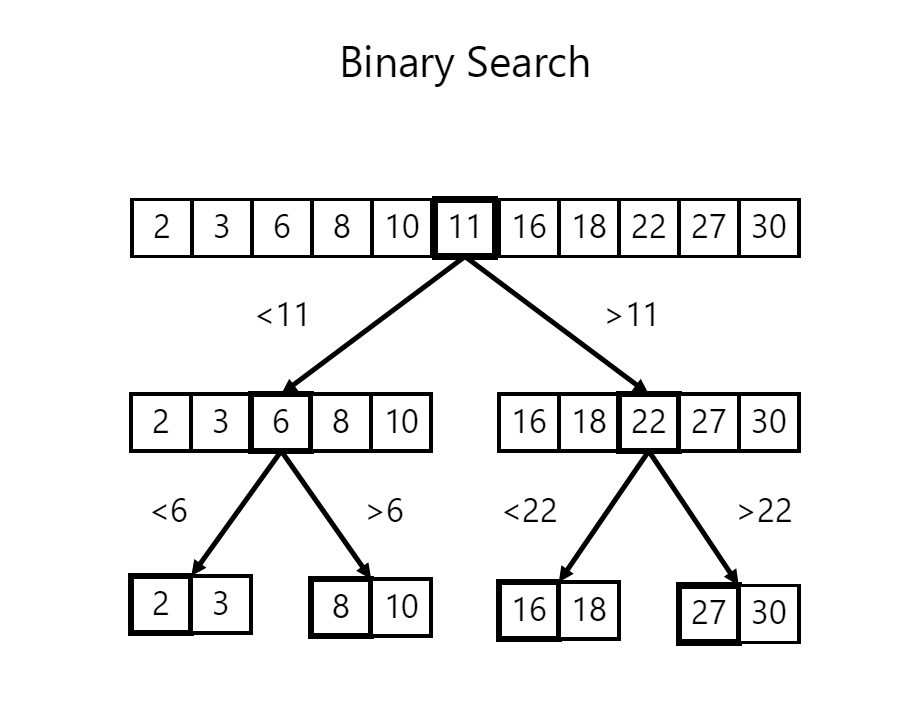
- Searching: Linear Search, Binary Search
- Graph Algorithms: BFS, DFS, Dijkstra’s Algorithm
Why is DSA Useful?
1. Improves Problem-Solving Skills
DSA trains your brain to think logically and efficiently, not just write code.
2. Makes Programs Faster and Efficient
Good DSA helps:
- Reduce time complexity (faster execution)
- Reduce space complexity (less memory usage)
Example:
- Searching in an array → O(n)
- Searching using Binary Search → O(log n)
3. Essential for Interviews & Competitive Programming
Most product companies test:
- Arrays
- Strings
- Trees
- Graphs
- Dynamic Programming
Without DSA, clearing coding interviews is very hard.
4. Helps in Real-World Applications
DSA is used everywhere:
| Application | Used DSA |
|---|---|
| Google Search | Graphs, Trees |
| Social Media | Graphs |
| Databases | B-Trees, Hashing |
| Navigation Apps | Shortest Path Algorithms |
| E-commerce | Sorting & Searching |
5. Makes You a Better Developer
You can:
- Choose the right data structure
- Write clean and optimized code
- Debug performance issues easily
Simple Real-Life Example
Imagine a library
- Bookshelf (Array) – Books in order
- Index (Hash Map) – Find a book instantly
- Stack – Undo operation
- Queue – People waiting to borrow books
Without proper organization, everything becomes slow and messy — same with programs without DSA.
Who Should Learn DSA?
- Students
- Beginners in Programming
- Software Developers
- Competitive Programmers
- Anyone preparing for tech interviews
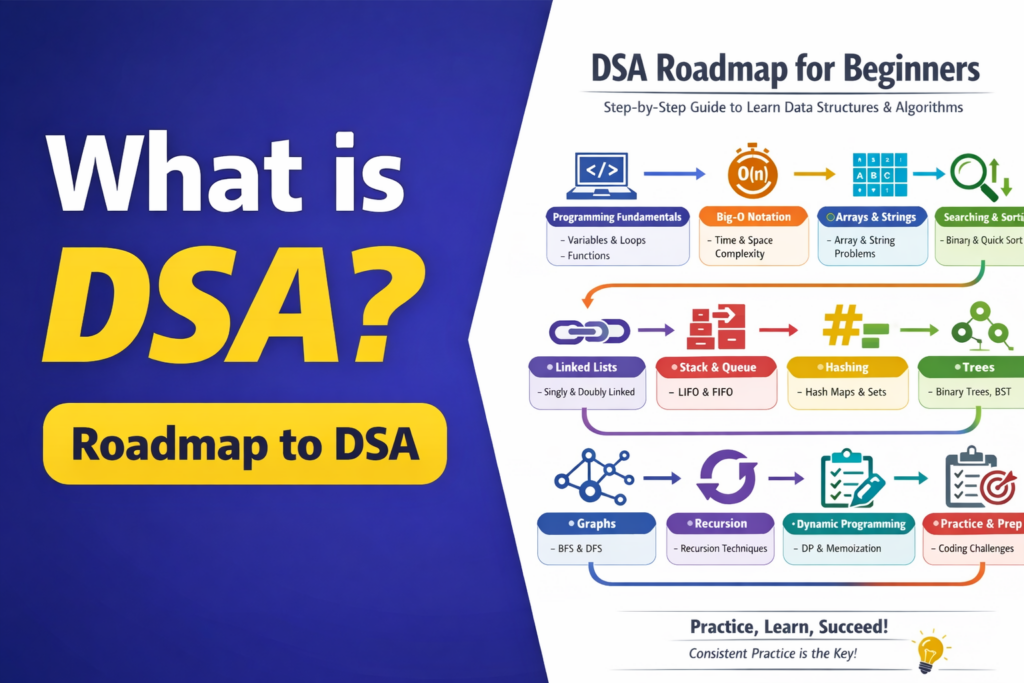
DSA Roadmap for Beginners (Step-by-Step)
This roadmap helps you learn Data Structures and Algorithms in the right order, without confusion.
Step 1: Programming Fundamentals
Before starting DSA, make sure you are comfortable with:
- Variables & Data Types
- Loops (for, while)
- Conditional Statements (if-else, switch)
- Functions
- Basic input/output
Recommended: Learn DSA using one language (JavaScript / Java / Python).
Step 2: Time & Space Complexity (Big-O)
Understand how efficient your code is.
Topics:
- What is Time Complexity
- What is Space Complexity
- Big-O Notation (O(1), O(n), O(log n), O(n²))
Examples:
- Linear Search → O(n)
- Binary Search → O(log n)
Step 3: Arrays & Strings (Foundation)
These are the most important DSA topics.
Learn:
- Array traversal
- Insert / Delete elements
- Two-pointer technique
- Sliding window
- String manipulation
- Frequency counting
Most interview questions start here.
Step 4: Searching & Sorting Algorithms
Learn how data is searched and ordered efficiently.
Searching:
- Linear Search
- Binary Search
Sorting:
- Bubble Sort
- Selection Sort
- Insertion Sort
- Merge Sort
- Quick Sort
Step 5: Linked Lists
Learn how dynamic memory works.
Topics:
- Singly Linked List
- Doubly Linked List
- Insert / Delete nodes
- Reverse a Linked List
- Detect a cycle
Step 6: Stack & Queue
These help manage data flow.
Stack:
- Push / Pop
- Applications (Undo, Expression evaluation)
Queue:
- Simple Queue
- Circular Queue
- Priority Queue
Step 7: Hashing (Hash Maps / Sets)
Used for fast lookups.
Learn:
- HashMap / Object / Map
- HashSet
- Frequency problems
- Removing duplicates
- Two-sum problems
Step 8: Recursion
Important for trees and complex problems.
Topics:
- Base condition
- Recursive calls
- Recursion vs Iteration
- Stack overflow concept
Step 9: Trees
Used in databases and system design.
Learn:
- Binary Tree
- Binary Search Tree (BST)
- Tree traversals:
- Inorder
- Preorder
- Postorder
- Level order
Step 10: Graphs
Used in social networks, maps, and AI.
Topics:
- Graph representation
- BFS (Breadth-First Search)
- DFS (Depth-First Search)
- Shortest path basics
Step 11: Dynamic Programming (Advanced)
For optimizing recursive problems.
Learn:
- Overlapping subproblems
- Memoization
- Tabulation
- Classic problems (Fibonacci, Knapsack)
Step 12: Practice & Interview Preparation
Practice is the key to mastering DSA.
Do:
- Solve daily problems
- Revise patterns
- Mock interviews
- Timed coding practice
Platforms:
- LeetCode
- HackerRank
- CodeChef
- GeeksforGeeks
Final Tip
DSA is not about memorizing solutions — it’s about recognizing patterns.
Consistency matters more than speed.
Next blog : AI Tools for Students (Free & Easy to Use)
Next blog : Evolution of Web Development – Logic Layers
Pingback: ChatGPT Prompt Examples for Beginners - Logic Layers
Pingback: What is Web Development - Logic Layers
Pingback: Evolution of Web Development - Logic Layers
Pingback: Frontend vs Backend Development - Logic Layers
Pingback: How Websites Work ? - Logic Layers